Kotzilla MCP Server
Overview
The Kotzilla MCP Server connects your AI coding assistant to the Kotzilla Platform. It gives the assistant the same structural and runtime context Kotzilla captures from real user sessions (dependency graphs, resolution timings, crashes, component behavior), together with a knowledge base of proven fix patterns for Android and Kotlin Multiplatform projects.
As a result, the assistant can go from detecting an issue to producing a concrete fix, all inside the editor you already use.
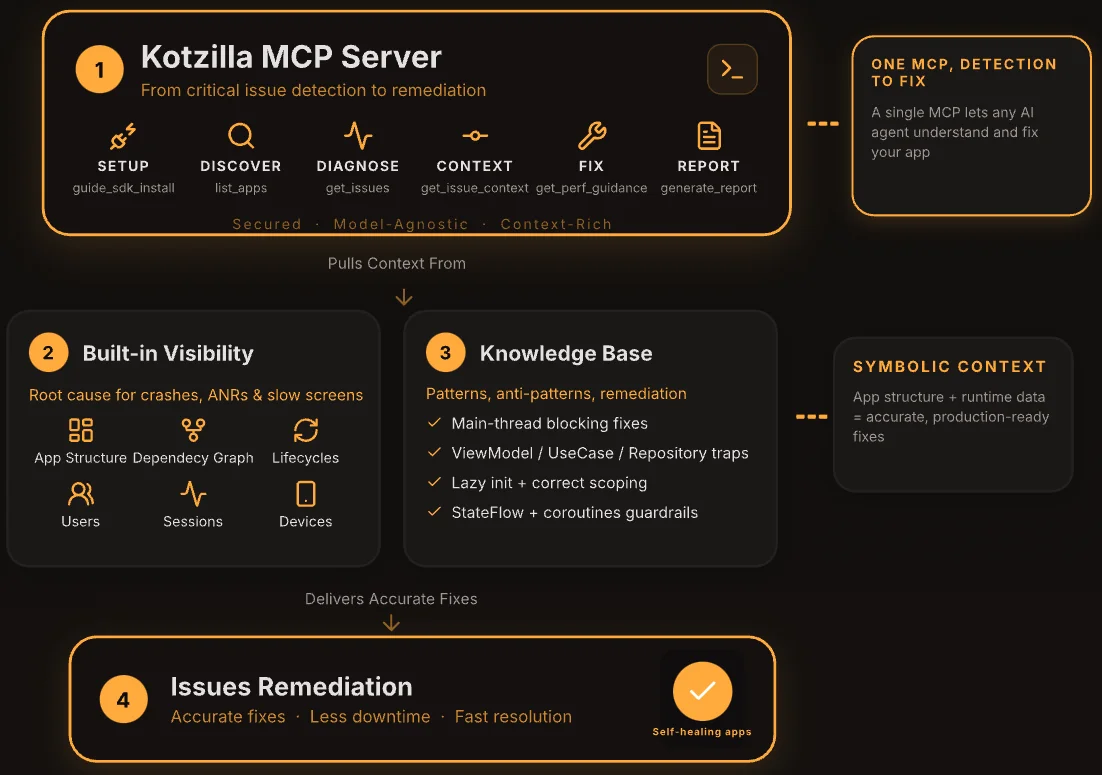
With the MCP Server you can:
- Register your app and configure the SDK in your project through a single natural-language prompt.
- Analyze performance and stability issues from real user sessions across Android and Kotlin Multiplatform targets.
- Get root cause analysis with full dependency resolution trees and timings.
- Get guided fix recommendations and apply them directly in your code.
Key capabilities
Automated setup
Register your app on the Kotzilla Platform and set up the SDK through a single prompt. The assistant reads your project structure (package name, app type), creates the app on the platform, generates kotzilla.json, updates the version catalog and Gradle plugin, and wires up SDK initialization. It detects whether your app uses Koin and sets it up accordingly, including apps on Hilt, Metro, Dagger, or manual DI. See Setup with Hilt, Metro, or manual DI.
Performance and stability analysis
Analyze performance and stability issues from real user sessions across Android, iOS, Desktop (JVM), JS, and WASM targets. Ask for a lint-style report, compare versions to spot regressions, or rank issues across all your registered apps by severity.
Root cause analysis
Get full dependency resolution trees with timings, identify blocking components on specific screens, trace crashes with symbolicated stack traces, and understand on which thread each event runs.
Impacted-population and session analysis
See who an issue affects, not just that it exists: a breakdown of the devices and OS versions hit, with the ability to open the worst session's full timeline (Koin resolutions, lifecycle, screen renders, threads). Your assistant gets this from get_issue_context with include_sessions, so it can sample and compare sessions without opening each one in the Console, and can focus any analysis on specific devices or OS versions.
Guided fixes in your code
Retrieve fix patterns specific to the detected issue type (blocking calls in Koin modules, eager initialization, heavy ViewModel init, StateFlow strategies, constructor work, scope misuse), then let the assistant read your code and apply changes across multiple files under your review.
Koin configuration diagnosis and fixes
Beyond runtime performance, the assistant can diagnose Koin configuration problems (missing bindings, wrong qualifiers, scope errors) and apply the fix in your code. This works even without prior Kotzilla setup: paste a Koin error and the assistant resolves it. See Fix Koin issues with the MCP Server.
Per-version data control
List your app versions and turn monitoring on or off per version, directly from your assistant, so you control which builds send data to the platform.
What you can ask
Once the SDK is set up and your first sessions are recorded, natural language is enough. Here are some examples:
Generate a performance report
Generate a report for my app
Returns a compact lint-style summary with pass/warn/fail status, crash count, ANR count, and prioritized fixes.
Compare versions
Is version 1.2.1 performing better than 1.1.5?
Compares crashes, screen rendering times, issue counts, and component performance between two versions to spot regressions.
Find what to fix first across all your apps
Which issues should I focus on as main priority among my apps?
Generates reports across all your registered apps and ranks them by severity: crashes first, then startup time, ANR, and others.
Root cause analysis
What are the main performance issues in my app?
Lists all detected issues ranked by impact. From there you can ask "Why is it slow?" and the assistant shows what is causing the problem: dependency resolution trees with timings, which components are blocking a specific screen, what is creating ANR risk, and on which thread everything runs.
Fix issues in your code
How can I fix this issue?
The assistant gets fix patterns specific to the issue type: stack traces of crashes, blocking calls in Koin modules, eager initialization, heavy ViewModel init, StateFlow strategies, constructor work, and scope misuse. It reads your code and applies the changes across multiple files under your review.
Investigate crashes
Show me the crashes on the iOS target of my CMP app and help me fix them
Returns symbolicated stack traces with surrounding lifecycle events, and suggests fixes based on the crash context.
Investigate who is impacted
Which devices and OS versions are hit by this issue, and which session is worst?
Returns a device and OS breakdown of the impacted sessions and points you to the worst one, which you can open directly.
Fix a Koin configuration error
I'm getting a Koin error, here is the message: ...
The assistant diagnoses the configuration problem (missing module, wrong qualifier, scope misuse) and applies the fix. See Fix Koin issues with the MCP Server.
Available tools
| Tool | What it does |
|---|---|
list_apps | List your registered apps |
create_app | Register a new app |
guide_sdk_installation | Get SDK setup instructions for your app type |
generate_app_config | Generate kotzilla.json (creates a new API key each call) |
get_platform_activity | See which apps are active and sending data |
get_screen_performance | Screen rendering times and ANR counts |
get_issues | Performance and architecture issues |
get_issue_context | Deep dive: dependency tree, timings, stack traces, and impacted sessions |
get_fix_guidance | Fix patterns and best practices for a given issue type |
generate_report | Performance summary report |
list_app_versions | List app versions and whether each is ingesting data |
set_app_versions_enabled | Turn data collection on or off per version |
koin_diagnose | Diagnose a Koin configuration issue |
koin_search_graph | Search the Koin dependency graph |
koin_apply_fix | Apply a fix for a Koin configuration issue |
Authentication and security
On first use, the MCP Server asks you to authenticate with your Kotzilla account. If you do not have an account yet, you can create one for free at console.kotzilla.io.
All communication between the MCP Server and the Kotzilla Platform is encrypted over HTTPS. The same API key scoping and data rules apply as for the SDK and Console.
The MCP Server operates on the same technical data collected by the Kotzilla SDK. The SDK is not designed to collect the personal data of your end users, and Kotzilla does not intentionally collect any. See Kotzilla SDK data processing for detail.
Why use the MCP Server
- Zero manual onboarding: one prompt registers the app and configures the SDK.
- Context where you work: stay in your editor or terminal while your assistant reasons over real session data.
- Fixes, not just findings: guided remediation combines structural context with proven Kotlin fix patterns.
- Works with any MCP-compatible tool: Claude Code, Cursor, Windsurf, the Android Studio MCP panel, and any LLM-powered terminal assistant.
Get started
To install the MCP Server and register your first app, follow the MCP Server quick start guide.