Get started with the NowInAndroid demo app
This section provides everything you need to start debugging the NowInAndroid example app directly in Android Studio or IntelliJ IDEA, with the Koin IDE Plugin or with your AI coding assistant via the Kotzilla MCP Server.
You will learn
- How to install the Koin IDE Plugin or the Kotzilla MCP Server in your AI coding assistant
- How to set up the Kotzilla SDK in the NowInAndroid app, via the Koin IDE Plugin flow or via a one-prompt MCP flow
- See and investigate the first issues automatically identified by the platform, from your IDE, from the Kotzilla Console, or from your AI coding assistant
Prerequisites
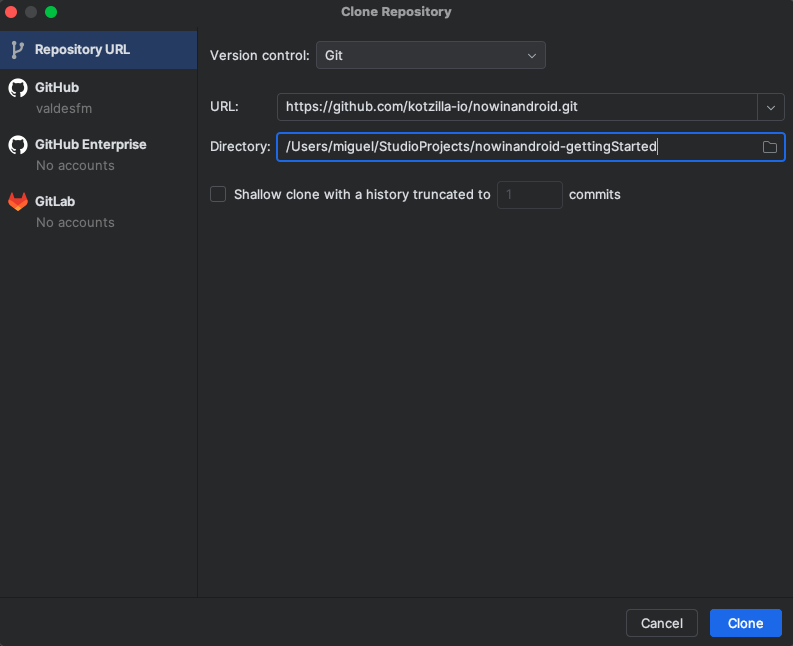
Before you begin Clone the NowInAndroid app in your Android Studio:
- Open Android Studio and select "Check out project from Version Control" from the Welcome screen. If a project is already open, go to File > New > Project from Version Control > Git.
- In the URL field, paste the URL of the NowInAndroid repository for Koin
- Click "Clone." Android Studio will clone the repository to your local machine and open it. Make sure you are using the branch
Koin_start