Verify your fixes
1. Capture the "after" session
- In
app/build.gradle.kts, bumpversionNameandversionCodeone last time, for example tocodelab-2.0. Any name works, as long as this build is the newest one. - Rebuild and install the app.
- Run the navigation path twice. This time, Interests does not crash.
- Send the app to the background or close it.
The first launch after installing a new build is slower, because Android is still compiling the app. The second run is the one that measures your code. If a run gets interrupted, bump the version and run the path again: sessions stay attached to their version.
2. Compare the two versions
Ask your agent:
On Kotzilla, compare codelab-1.0 with my latest version, for the crash on Interests and the issues on MainActivity, MainActivityViewModel and ListenableWorker. For each one: gone, or how far did it drop?
If your latest version does not appear yet, wait a minute and ask again. Each issue records the versions it appeared on, so the comparison shows whether it is gone from your latest version. Expect this:
From codelab-1.0 | Expected | Our run |
|---|---|---|
| Crash on the Interests screen | Gone | Gone |
ANR on MainActivity | Gone | Gone (3 ANRs before) |
Slow screen on MainActivity | Gone | Gone: 5.9 s P95 before, 239 ms after |
| Slow warm startup | Gone | Gone |
MainActivityViewModel blocking the main thread | Gone | Gone (5.1 s before) |
ListenableWorker blocking a background thread | Gone, or a few hundred ms | Gone (2.1 s before) |
| Cold startup | Down to a few seconds | 16 s P50 before, 1.8 s P50 after |
For the last two rows, look at how far the number dropped rather than whether the issue disappeared. Cold startup is often still listed: in our run, the first launch after install took 4.8 s and crossed the 3.5 s threshold, while the second one did not.
You can also ask for the "after" report:
Generate a Kotzilla report for this app, version codelab-2.0.
In our run, it went from 11 issues, 3 ANRs and 1 crash to 1 issue, no ANR and no crash.
3. Check it in the Console
Open the Dashboard on your latest version. The ANR free rate and the crash free rate are back to 100%, and every screen renders in a few hundred milliseconds:
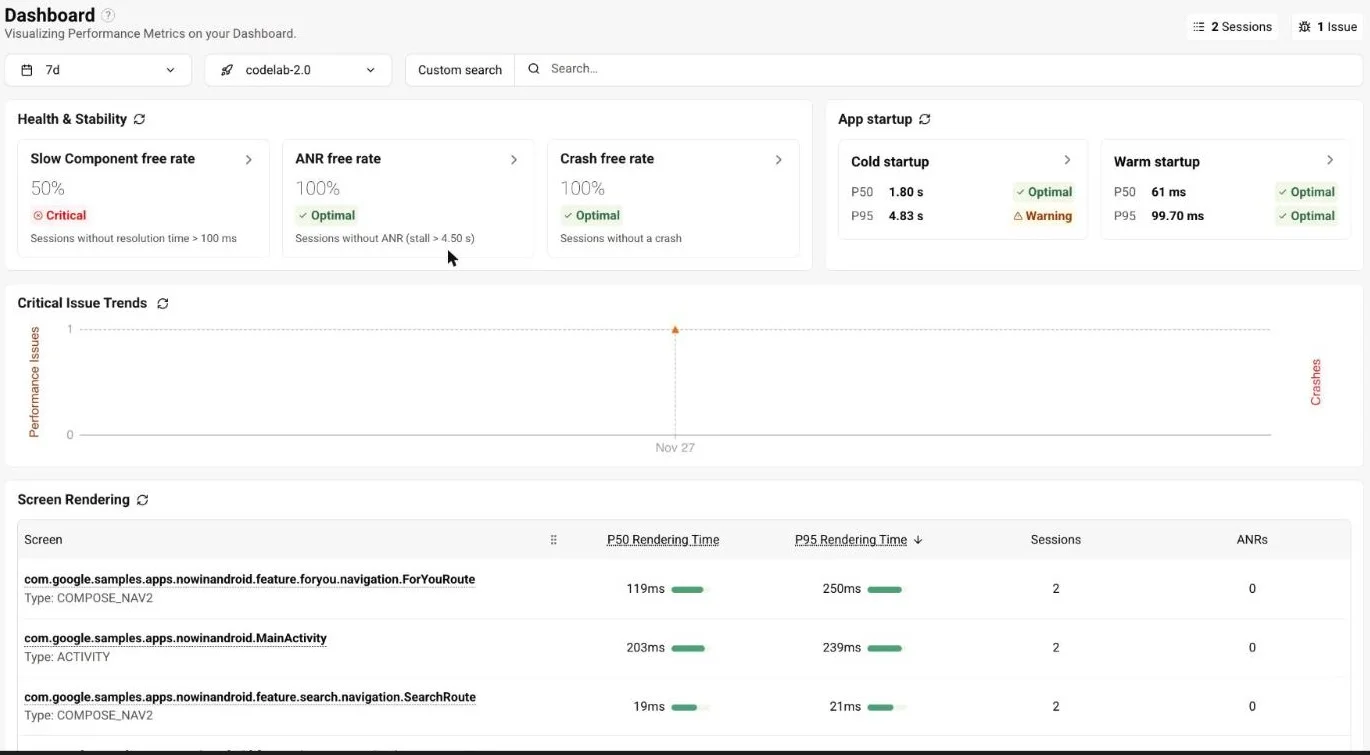
Compare it with the Dashboard of codelab-1.0: 5.15 s on MainActivity, with 3 ANRs.
What's next
- Close the issues: ask your agent to close each fixed issue with the version that fixed it, or ask for it upfront: Fix the ANR on MainActivity and close the issue once the fix is verified.
- Set up your own app: one prompt registers it and sets up the SDK. See the MCP Server quick start.
- Read more about each issue type in Fix issues.